Special Education Behavior Tracking Software: A Teacher's Guide (2026)
An honest comparison of behavior tracking software for special education teachers, classroom teachers, and IEP documentation, based on firsthand testing whenever possible.
If you've searched for special education behavior tracking software, you've probably noticed most of the advice is written for district administrators evaluating enterprise platforms. That's an important job, but it wasn't the problem I was trying to solve.
As a third-grade classroom teacher, I needed a way to remember what happened during math, recess, and dismissal before my next parent conversation or IEP meeting. That's a very different problem from choosing software for an entire district.
I don't spend my day running discrete trials or collecting service minutes anymore. Before becoming a classroom teacher, I spent nearly a decade working as a behavior therapist, so I understand why those tools exist. Today, my classroom has 25 students, and most of the time I'm the only adult in the room. If a student has a behavior incident at 9:15, another at recess, and I get an email from a parent after school, I need to remember the details without stopping instruction every few minutes.
Some of the software in this guide is designed for special education teachers and related service providers collecting structured IEP data. Other tools are built for classroom teachers who need fast, day-to-day documentation between lessons. Neither approach is better. They solve different problems, and choosing the right one depends on your role and how you spend your school day.
Looking for general classroom behavior tracking apps instead? Read Best Behavior Tracking Apps for Teachers in 2026.
That's why I decided to research this category differently. Instead of comparing feature lists, I signed up for the software, explored how it actually worked, and came back to one simple question:
Would I recommend this to another teacher with a classroom like mine?
How I Evaluated Each Tool
I wanted this guide to be more than another software roundup based on company websites and marketing pages. Whenever possible, I signed up for the software myself and explored how it actually worked. When I couldn't test a product firsthand, I relied on the company's published documentation and clearly identified those sections in the review. For every product, I came back to the same four questions:
- How easy is it to get started?
- Could I realistically document behavior during a busy school day?
- Would the reports actually help during a parent conference or IEP meeting?
- Would I recommend it to another teacher?
Why Most Special Education Software Reviews Miss the Point
One thing became clear while I researched this article: many software reviews compare products that aren't really competing with each other.
That's because they're built for different people.
Some software is designed for district administrators, special education directors, or case managers responsible for compliance, reporting, and managing hundreds or even thousands of students. Those platforms often include IEP management, service tracking, Medicaid billing, scheduling, and district-wide reporting. They're powerful systems, but they're usually purchased by school districts, not individual teachers.
Other software is designed for the people working directly with students every day.
That includes special education teachers collecting IEP goal data, behavior therapists running discrete trials, and classroom teachers trying to document what happened before the details disappear. Those users need something completely different. Speed matters more than district reporting. Ease of use matters more than dozens of configuration options. If entering one behavior takes two minutes, most teachers simply won't use it consistently.
During my research, I spent time using AbleSpace. It became obvious very quickly that it wasn't trying to be a classroom behavior log for a general education teacher. It was built for collecting structured data tied to student goals. If your day revolves around one-on-one instruction, discrete trials, prompts, and progress monitoring, that makes perfect sense.
When I worked as a behavior therapist, there were days when I worked with just one student. Spending several minutes recording trial-by-trial data wasn't a burden. It was part of the job. Today, with 25 kids and no other adult in the room, if I spend several minutes documenting one student, I've stopped monitoring the other 24.
Before looking at individual products, ask yourself one simple question:
What documentation problem am I actually trying to solve?
What Features Should You Look for in Behavior Tracking Software?
The best behavior tracking software isn't necessarily the one with the longest feature list. It's the one you'll actually use consistently.
After testing several products and reflecting on my own classroom experience, I found myself coming back to the same priorities over and over. No matter how many features a platform offered, none of them mattered if the software didn't fit naturally into the school day.
Capture Information Quickly
If documenting one behavior takes several minutes, most classroom teachers simply won't do it consistently.
The best tools make it easy to record what happened while it's still fresh, then get back to teaching.
Keep Information Organized
Good documentation isn't just about writing notes. You need to find those notes weeks later before a parent conference, IEP meeting, or conversation with an administrator.
Look for software that keeps everything connected to the student and makes searching simple.
Generate Useful Reports
Raw notes are helpful. Organized reports are even better.
Whether you're preparing for a parent meeting, sharing information with your special education team, or getting ready for an IEP meeting, your documentation should tell a clear story without hours of extra work.
Show Patterns Over Time
A single note about a rough Tuesday rarely tells the whole story. What matters more is whether that Tuesday was a one-time thing or part of a pattern that shows up every week.
That's where day-to-day documentation earns its keep. Individual notes are useful in the moment, but the real value shows up weeks later, when you can look back and see that a behavior clusters around a specific time of day, a specific setting, or a specific transition. That kind of pattern is exactly what IEP teams and MTSS teams look for when deciding whether a support is working or whether it's time to try something else.
Quick Comparison
AbleSpace
Best for special education teachers, behavior therapists, and related service providers. Not built for fast daily logging. Excellent for IEP goal data collection.
BehaviorSnap
Best for mobile behavior data collection on iPhone/iPad. Likely fast in practice. Excellent for IEP goal data collection (based on published features, not firsthand testing).
ShortHand
Best for general education and inclusion teachers who want fast documentation. Built for speed during a busy school day. Limited for formal IEP goal data collection.
ClassDojo
Best for classroom communication and positive behavior reinforcement. Fast to use. Not designed for IEP goal data collection.
AbleSpace
Best for: Special education teachers, behavior therapists, and related service providers collecting structured IEP goal data.
After spending time exploring AbleSpace, one thing became obvious very quickly: this software knows exactly who it's built for.
Unlike general classroom behavior tracking apps, AbleSpace is designed around collecting data tied to student goals. If your day revolves around discrete trials, prompt levels, progress monitoring, and documenting IEP objectives, the workflow makes a lot of sense.
What I Liked
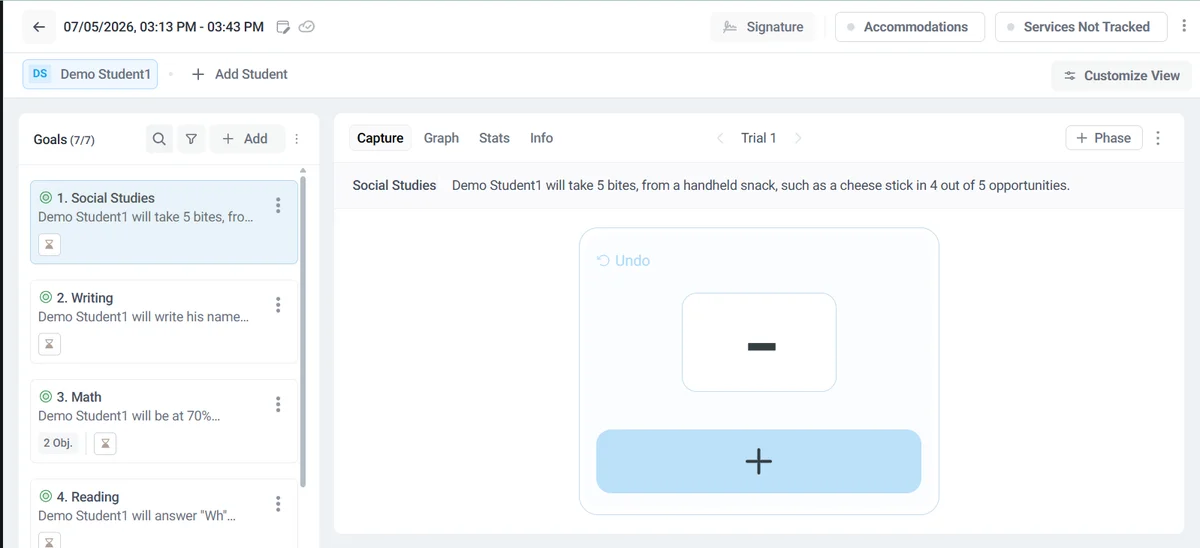
Getting started was easy. I was able to sign in with Google, and the demo account included two preloaded students so I could explore the software immediately without creating my own data. That made it much easier to understand how the platform worked.
Once inside, I found the organization impressive. Students, goals, notes, reports, and progress monitoring were all easy to locate, and searching for a specific student was straightforward.
I also appreciated the reporting tools. AbleSpace generates clean graphs and progress reports that would be useful during IEP meetings or when discussing student progress with administrators or families.
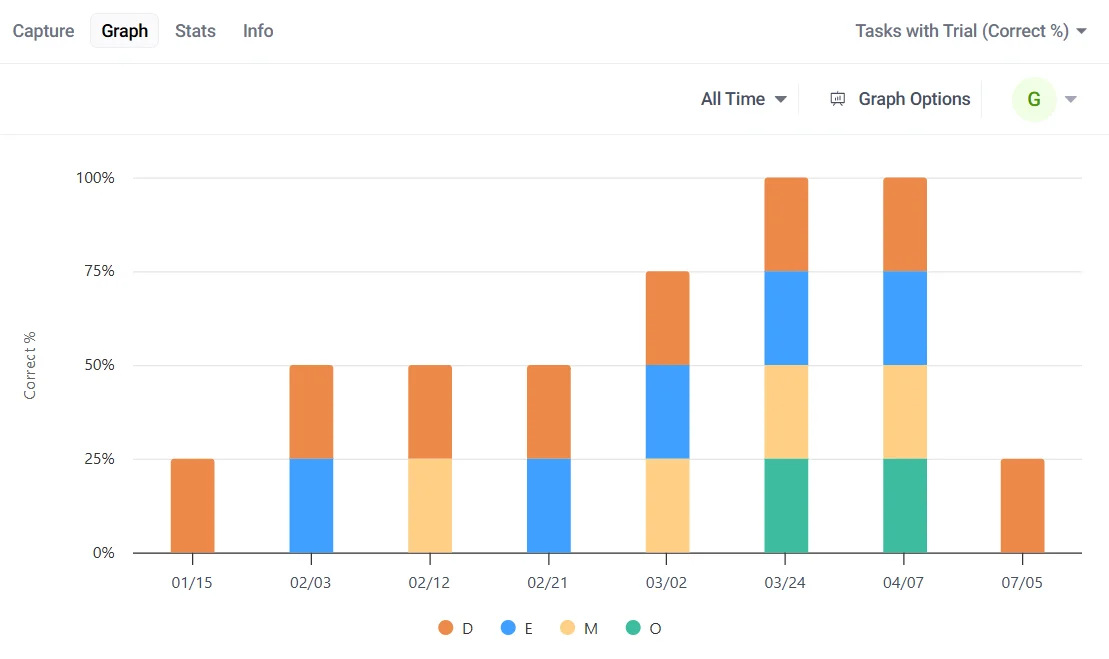
One feature that stood out was the AI note summary. After entering notes, I could have the software automatically summarize them. That's a thoughtful addition that could save time for teachers writing longer observations.
The company also provides an extensive help center with dozens of short tutorial videos covering individual tasks, making it clear they expect users to fully learn the platform rather than simply figure it out as they go.
Where It Didn't Fit My Classroom
This isn't really a criticism.
As I explored AbleSpace, I realized it wasn't designed for the kind of documentation I do as a third-grade classroom teacher.
AbleSpace isn't trying to solve that problem.
Instead, it's built for structured data collection while working directly with individual students. Recording trial-by-trial performance, documenting prompt levels, and tracking progress toward IEP goals are exactly what many special education teachers and behavior therapists need.
In other words, it excels at the job it was designed to do.
My Recommendation
If you're a special education teacher collecting IEP goal data, a behavior therapist running discrete trials, or another professional who spends significant time working one-on-one with students, AbleSpace is absolutely worth considering.
If you're a general education classroom teacher, I don't think AbleSpace is aimed at the kind of quick, in-the-moment documentation that happens throughout a busy school day.
If I were still working as a behavior therapist, I would have kept exploring AbleSpace.
How I Tested AbleSpace
I created a demo account, explored the platform using the included demo students, recorded sample data, generated reports, reviewed the tutorial library, and evaluated the software from the perspective of a third-grade classroom teacher with previous experience as a behavior therapist.
BehaviorSnap
Best for: Teachers and behavior professionals looking for an iPhone-based behavior data collection app.
BehaviorSnap consistently appeared while I was researching this article and is one of the better-known behavior tracking apps for special education professionals. Unlike AbleSpace, however, I wasn't able to evaluate it firsthand because the full app required a paid iOS subscription.
Based on its published features, BehaviorSnap focuses on structured behavior data collection, including ABC data, frequency counts, interval recording, duration tracking, and report generation. Like AbleSpace, it appears to be designed primarily for professionals collecting formal behavior data rather than general classroom documentation.
Its biggest advantage appears to be mobility. Because it's built specifically for iPhone and iPad, teachers and therapists can record observations while working directly with students instead of waiting until later.
What I Can and Can't Say
I can confidently say that BehaviorSnap offers the kinds of structured data collection tools many special education teachers and behavior specialists need.
What I can't honestly evaluate is how well those features work during a real school day. Since I wasn't able to use the app myself, I can't tell you whether the workflow feels intuitive, how quickly behavior can be recorded, or whether the reporting experience matches the marketing.
For those questions, I'd encourage you to explore the app yourself before making a decision.
My Recommendation
If your work revolves around structured behavior data collection, BehaviorSnap deserves a place on your shortlist.
I plan to revisit this review once I've had the opportunity to spend more time using the app firsthand.
ShortHand
Best for: General education teachers, inclusion teachers, and special education teachers who need fast classroom documentation and parent communication, rather than detailed behavior data collection for formal behavior plans or intensive ABA programs.
Disclosure: I built ShortHand myself, so I'll do my best to review it objectively, but you should know upfront that I'm the founder.
As I mentioned earlier, most of the tools in this guide are built for structured IEP data collection. That's not the problem I had.
Before I built ShortHand, I went looking for something that would let me capture a quick note in seconds, whether I was talking to a parent, meeting with a colleague, or writing a report later. I couldn't find it, so I built it.
ShortHand wasn't built as a parent communication tool. It was built for teachers first.
What I Like
The biggest strength of ShortHand is how little friction there is to capturing a note. I could type or dictate what happened, save it, and get back to teaching without feeling like documentation had become another task competing for my attention.
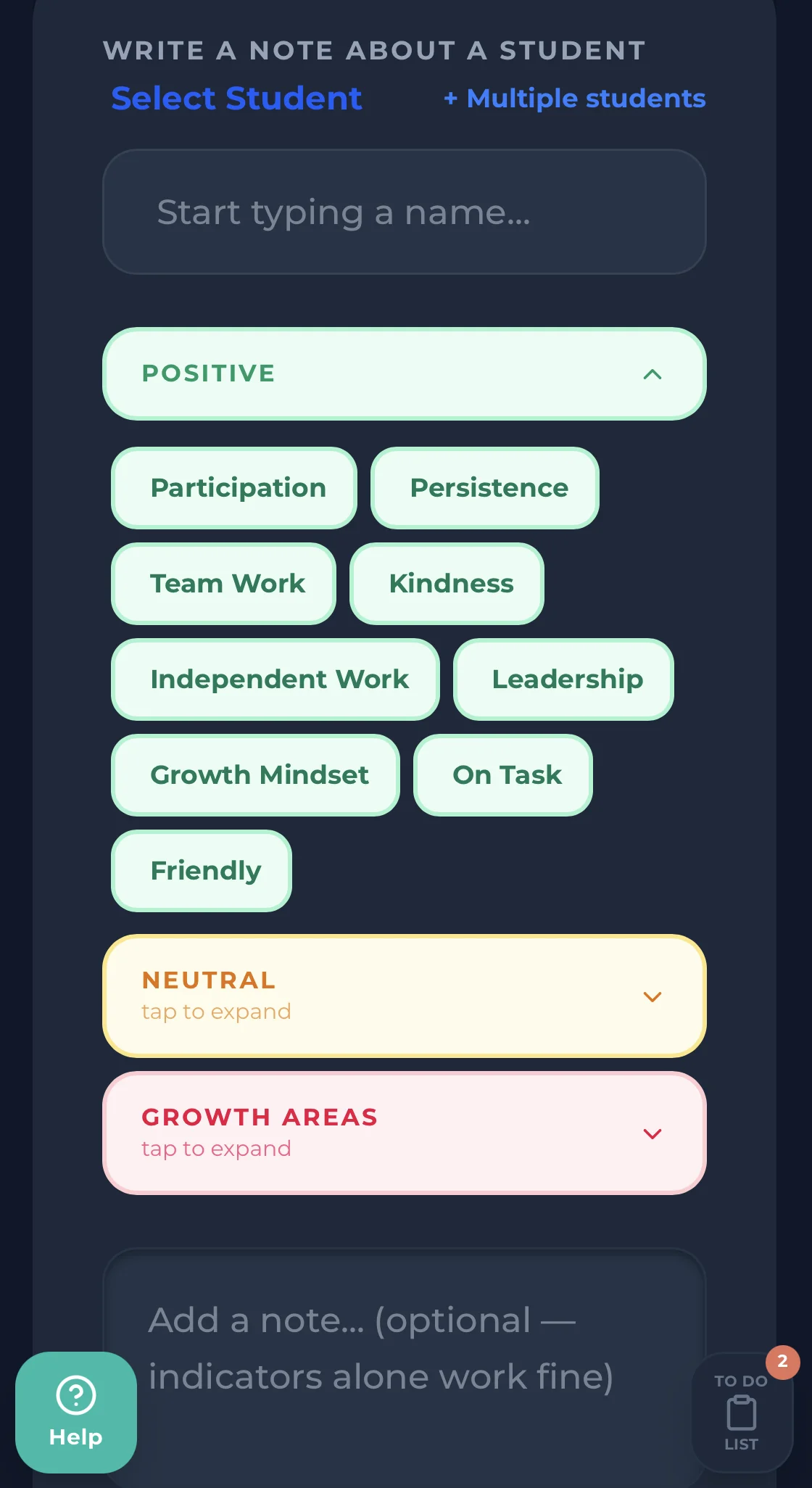
I didn't need to fill out a form or select from a list of behaviors. I just typed or spoke what happened, and it was saved. When I needed a parent-ready report, I could generate one from those same unfiltered notes in seconds, without rewriting anything myself.
Notes stayed organized by student automatically, so finding what happened weeks earlier for a parent conference or MTSS meeting was straightforward instead of a search through old messages or spreadsheets.
One area worth calling out on its own is parent contact. For a student on an IEP, documenting parent contact is often as important as documenting the behavior itself, since a team needs to see what was communicated to the family and when. ShortHand keeps that contact history next to the behavior notes for the same student, so both pieces are in one place instead of split across an email inbox and a separate log.
A few features stood out:
- Voice or text note entry
- Parent communication support
- Student accommodations and goals in one place
- AI-assisted report generation
- Ask ShortHand, a way to ask plain-language questions about the notes you've already logged for a student
If you're building out a fuller documentation habit, the IEP behavior documentation checklist is a useful reference for what to capture regardless of which tool you use.
Where ShortHand Isn't the Best Fit
ShortHand is not an IEP management system.
It doesn't replace district software for writing IEPs, tracking service minutes, or collecting detailed trial-by-trial instructional data.
If your day revolves around discrete trials, prompt hierarchies, or intensive one-on-one data collection, I think a platform like AbleSpace is a better fit because that's exactly what it was designed to do.
ShortHand doesn't collect trial-by-trial IEP data or replace specialized special education data collection software. However, it does let you store accommodations, support plans, behavior goals, and other important reminders alongside each student. For many general education and inclusion teachers, that's enough to keep critical information accessible throughout the school day without flipping between documents.
My Recommendation
If you're a classroom teacher trying to remember what happened before the details disappear, I think ShortHand is worth exploring.
If you're looking for software primarily focused on IEP compliance or detailed instructional data collection, I'd start with products built specifically for that purpose.
My hope is that, whether you choose ShortHand or another product, you end up with software you'll actually use consistently.
ClassDojo
Best for: Classroom communication, positive behavior reinforcement, and family engagement.
ClassDojo is one of the most widely used classroom management tools in education, so it deserves a place in this guide even though it wasn't designed primarily as a behavior documentation platform.
For encouraging positive behavior, communicating with families, and sharing classroom updates, ClassDojo does an excellent job. Millions of teachers use it every day for exactly those reasons.
Where it starts to fall short is long-term documentation.
If you're preparing for a parent conference, an IEP meeting, or a meeting with an administrator several weeks after an incident occurred, point totals and classroom messages usually don't provide the detailed history many teachers wish they had.
That's not really a criticism.
ClassDojo wasn't built to be a formal documentation system. That's also why I don't consider it a direct competitor to the other products in this guide. It was built to improve classroom communication and student engagement, and it's excellent at that.
My Recommendation
If your primary goal is classroom communication and encouraging positive behavior, ClassDojo remains one of the best tools available.
If your primary goal is building detailed behavior documentation over time, you'll probably want something designed specifically for that purpose.
Which Tool Would I Choose?
After spending time researching this category, I came away with one conclusion:
The right choice depends almost entirely on the kind of documentation you need to do.
If I returned to behavior therapy tomorrow and spent my day collecting discrete trial data and monitoring IEP goals, I'd seriously consider a platform like AbleSpace. That's exactly what it was designed to do, and it's clearly built to do that job well.
If I were a district administrator responsible for compliance, reporting, and managing hundreds of students, I'd be looking at an entirely different category of enterprise software.
But that's not my job. Today, I'm a third-grade teacher with no one else in the room, and ShortHand is what I built to survive that.
I don't believe every teacher should use ShortHand.
I do believe every teacher should use the tool that best fits the way they actually teach.
If this article helps you find that tool, then it accomplished exactly what I hoped it would.
If you want to see what fast classroom documentation looks like, the guided demo takes two minutes and doesn't require an account.
Frequently Asked Questions
Stop trying to remember everything.
Try ShortHand Free →